The open source team management tool for bots.

Structured and organized teams powered with Grok Bot

Founders copy it to map their bots in one place: an org chart, a work chart of who does what and when, and a directory of ready-made bots they can add to Grok Bot. Their data stays on their own computer.

git clone github.com/…/BotsEverywhere

How it runs on your computer →

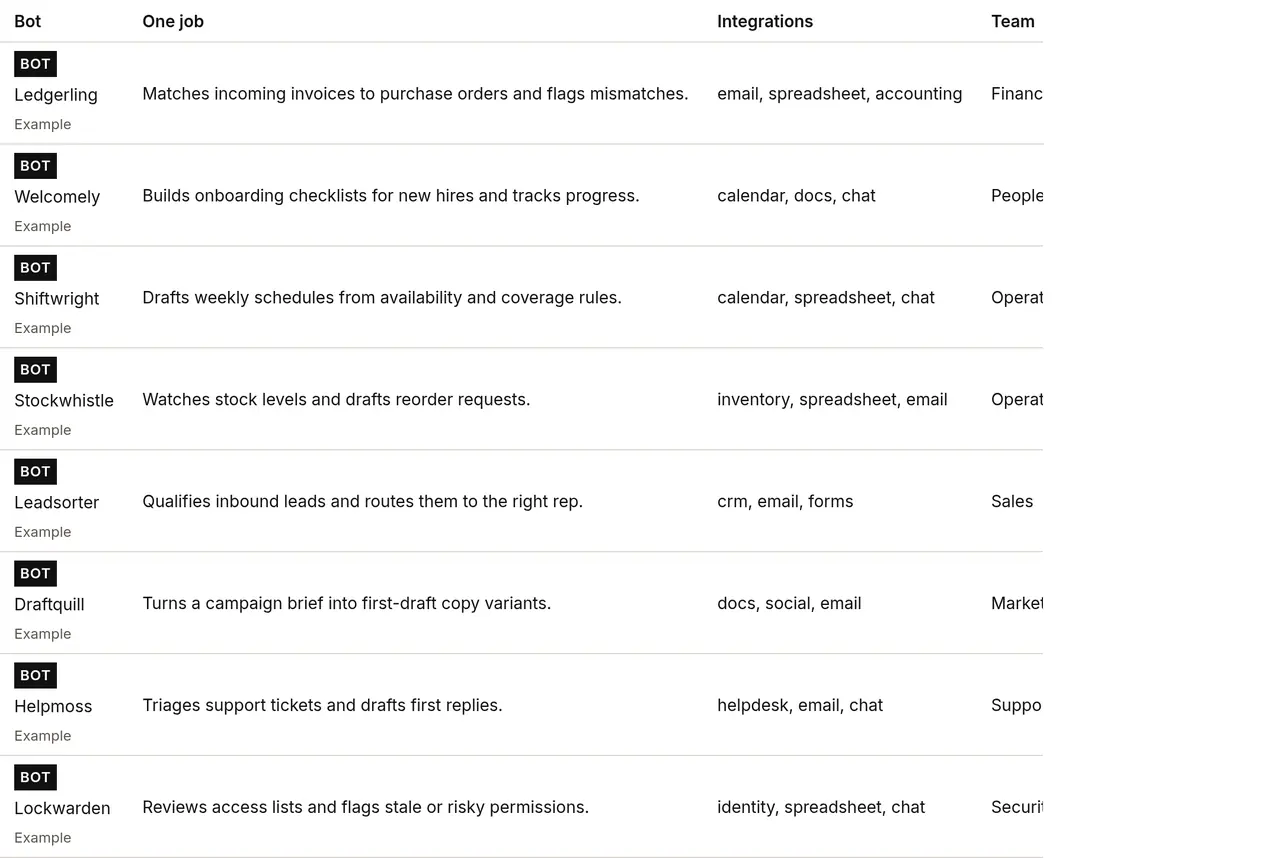
Bot directory

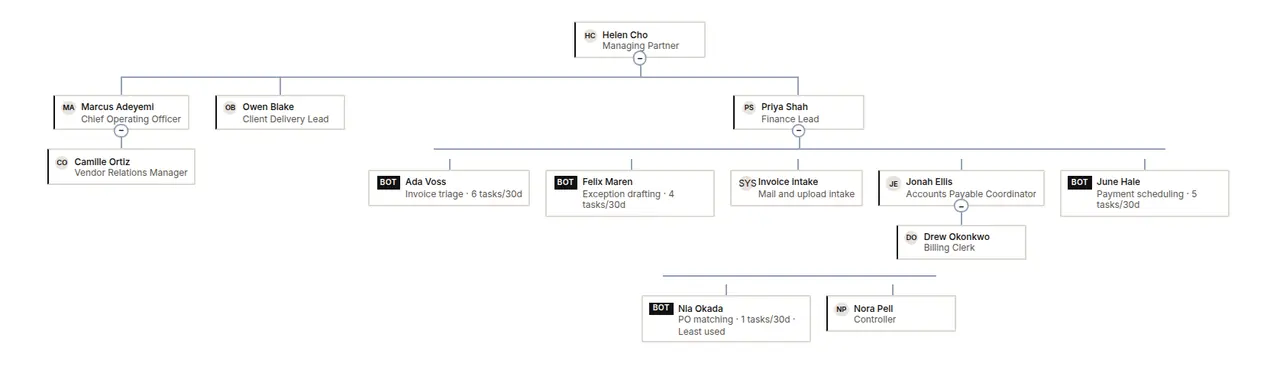
The org chart shows who owns what. The work chart shows how work moves. Every bot holds a seat with a written card: what it owns, what it may do, what needs approval, and when its work is done. Bots staff the seats. You keep the final say.

Why a work chart

Map the work, triggers, handoffs and routines by bots.

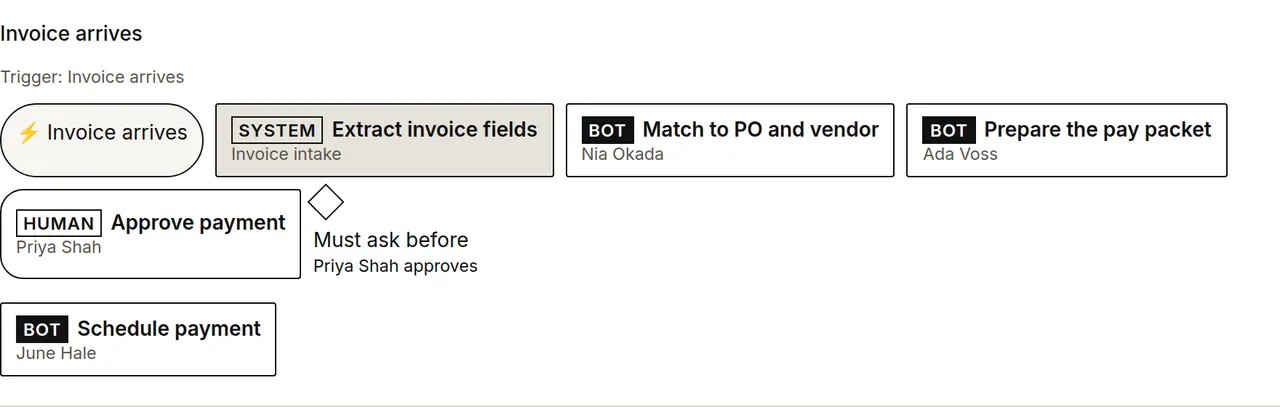
An org chart shows who reports to whom. It does not show how an invoice becomes a payment, who checks it, or where it waits. Once bots take over the routing, the summaries, and the first drafts, that second map is the one humans manage.

Every layer of management in your organization exists because, at some point, a human being was the most reliable way to gather information, interpret it, and move it to the next decision point.

Kulkarni, Bodan, and Kilgour, Deloitte, The work chart vs. org chart, June 2026

Bots move the work. Humans manage it.

  1. Map the work

    Work chart

    Every process starts from a trigger and moves step by step to an outcome. Handoffs, waits, and steps with no one assigned are in plain view, and so is who decides at each step.

  2. Instrument governance

    Run log

    Every step leaves one line in a plain text log, so status comes from the work itself instead of a weekly meeting.

  3. Fuse roles selectively

    Seat cards

    Every seat has a written card: what it owns, what it may do, what needs approval, and when its work is done. Give one seat a workflow end to end by editing its card.

  4. Add guardrails

    Checkpoints

    A step that sends, pays, posts, books, merges, publishes, or deletes waits for a named human. Bots draft. People approve.

If you automate a broken process, you scale the breakdown. That is why the work chart comes first: you see the broken step before a bot repeats it. Read the article

See the work move.

Three views of one team, from the app itself. No stock photos.
Sample organizations

Fictional organizations, each one person and their bots. Open one to read the org, the work, and the seats.

Work chart

Bots do the steps. Humans approve.

Every workstream starts from a trigger. Every checkpoint names a human.

One tool. Four parts.

Org chart

One person and their bots in one tree. Who owns what, who reports to whom.

Work chart

How work moves from a trigger to an outcome, with human checkpoints.

Bot directory

Ready-made bots with seat cards. No card, no hire.

Stored on your computer

Each organization is plain files in orgs/<id>/. Commit them with git.

Private by design. It runs on your computer.

Your org chart says who does what, who approves what, and where the money moves. That map stays with you.

  • Local only

    The app and its file writer listen on 127.0.0.1, the address only your own computer can reach.

  • Plain files you own

    Your org chart, seats, processes, and logs are markdown files in one folder. Read them, back them up, keep them in git.

  • No accounts

    No sign-up and no login. There is no password to forget or to leak.

  • No keys

    It stores no passwords, tokens, or API keys, and never asks for one.

  • No tracking

    The app has no analytics, no telemetry, and no third-party scripts. Its fonts ship with it, so opening a page in the app loads nothing from the internet.

  • You decide what connects

    Nothing leaves your computer unless you connect a bot to the folder yourself, and that folder is the same one you can open and read.

Questions, answered.

The short version. All questions

What is BotsEverywhere?

BotsEverywhere is an open source team management tool for bots. It maps your people and bots in one place: an org chart of who owns what, a work chart of how work moves step by step, and a directory of ready-made bots you can add to Grok Bot. It runs on your own computer, and your data stays there.

What is a work chart?

A work chart shows how work moves, where an org chart shows who reports to whom. Each process starts from a trigger and goes step by step to an outcome, naming who does each step, where work is handed off, and which steps wait for a human to approve.

Where is my data stored?

Your data is stored on your own computer, as plain markdown files. Each organization is a folder inside the orgs folder of the project: the org chart, the seats, the processes, and the logs. There is no BotsEverywhere server and no cloud copy.

Do I need an account?

No, there is no account, sign-up, or login. The app stores no passwords, tokens, or API keys, and never asks for one.

Does BotsEverywhere cost anything?

No, BotsEverywhere has no paid plans, no accounts, and no paid services. Your bots run in your own Grok Bot account, under Grok Bot terms.

Does BotsEverywhere work with ChatGPT, Claude, or other bots?

Not yet, it runs on Grok Bot today. Everything the app knows lives in plain files with documented formats, so a connector for another platform can be built, and contributions are welcome.

Open source

Read it. Change it. Make it yours.

BotsEverywhere is open source under the MIT License. Every screen, rule, and seat card is code or text you can read and change.

  • Fit it to your organization. Add fields, rename steps, change the look. Colors, type, and spacing live in one tokens file.
  • Add your own bots. A directory bot is one markdown file. Copy one, edit its card, and it is in the directory. Send it as a pull request and it ships to everyone.
  • Keep history. Commit the folder with git, and every change to your org chart is a diff you can review and roll back.
  • No lock-in. If you stop using it, your organization is still a folder of markdown files.

How to contribute →

The BotsEverywhere name and logo are not covered by the license.

One organization, as it sits on your disk
orgs/org-k3f9x2ma/
├── org.md        the organization and its chart
├── seats/        one card per seat
├── processes/    one file per workflow
└── log/          one line per step, one file per day
git clone https://github.com/botseverywhere-ai/BotsEverywhere

Map your team. Staff the seats.

Open source. Runs on your computer.